

复刻围住小猫小游戏(404页面源码),单机版
首先,无意冒犯原作者制作的404小游戏,如涉及侵权会立刻下架。其次,这个游戏做得非常成功,我闲暇时总会忍不住玩上一会儿。真的很感谢,能让人在紧张的工作间隙坐下来放松一下。再次,自从DeepSeek发布后,我曾尝试复刻这个小游戏,但效果不理想。后来一时兴起,买了学生认证的Gemini 3,想第一时间重新复刻。经过多次调试,我觉得已经没什么提升空间了,依然远不及原作的水平。所以决定将HTML分享出来,供大家闲时娱乐。再次感谢作者,这游戏真的很好玩!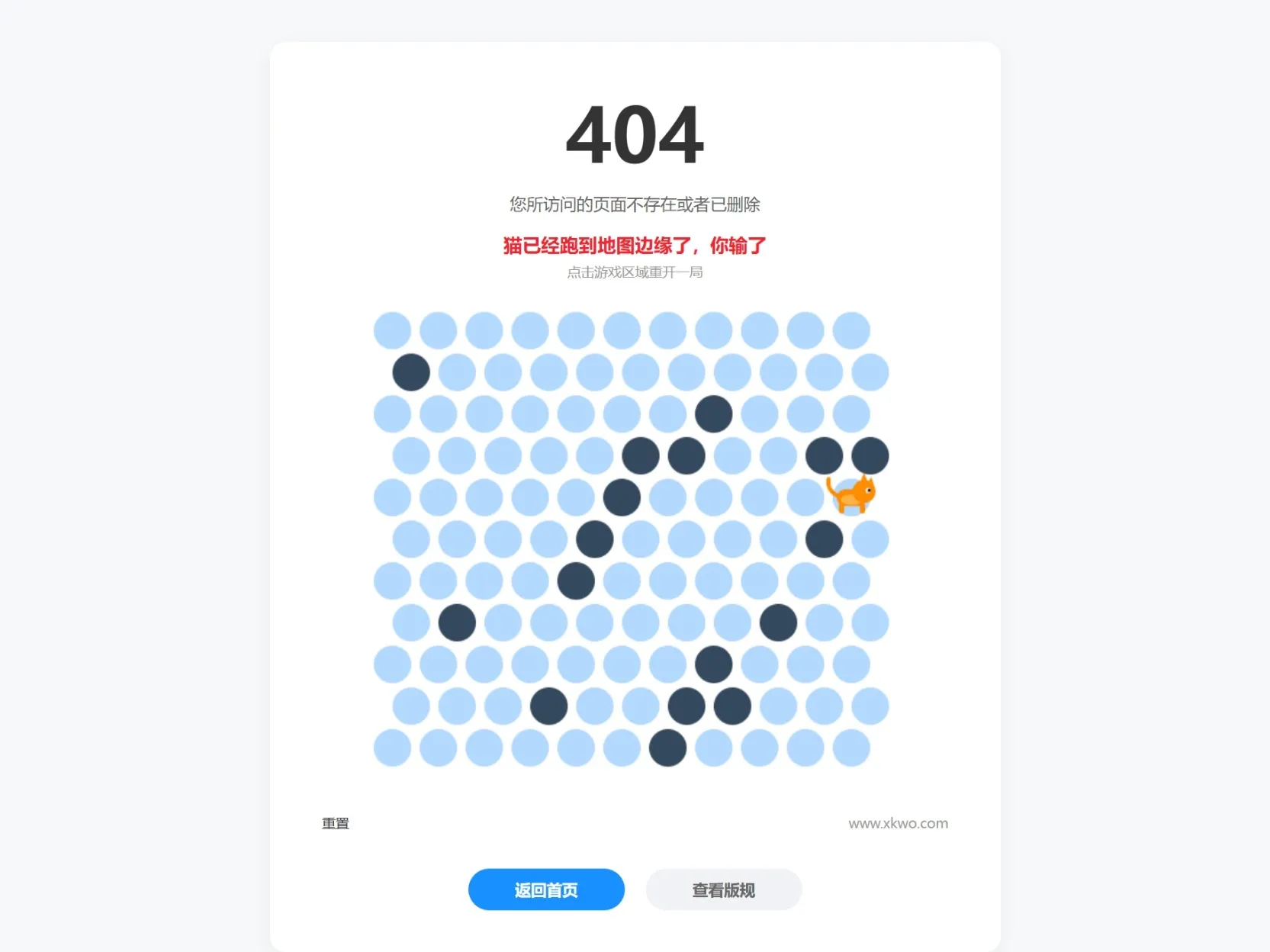
代码如下:(新建一个文本文档,复制一下代码,然后文本后缀改成HTML即可。)
<!DOCTYPE html><html lang="zh-CN"><head>    <meta charset="UTF-8">    <meta http-equiv="Content-Type" content="text/html; charset=utf-8">    <title>404 - 围住小猫 (原版魔性跑动复刻)</title>    <style>        body { margin: 0; background-color: #f7f8fa; display: flex; flex-direction: column; align-items: center; font-family: "Microsoft YaHei", sans-serif; padding-top: 40px; }        .container { background: white; padding: 40px 50px; border-radius: 15px; box-shadow: 0 4px 20px rgba(0,0,0,0.05); text-align: center; width: 600px; }        h1 { font-size: 72px; margin: 0; color: #333; font-weight: bold; }        .msg-top { color: #666; font-size: 16px; margin: 10px 0; }        .status-area { height: 60px; display: flex; flex-direction: column; align-items: center; justify-content: center; margin-bottom: 10px; }        .status-text { font-size: 18px; color: #1890ff; font-weight: bold; }        .status-text.win { color: #52c41a; }        .status-text.lose { color: #f5222d; }        .restart-hint { font-size: 13px; color: #999; margin-top: 5px; opacity: 0; transition: 0.3s; }        .restart-hint.show { opacity: 1; }        .canvas-box { padding: 5px; display: inline-block; overflow: visible; }        canvas { display: block; cursor: pointer; -webkit-tap-highlight-color: transparent; }        .link-row { margin-top: 25px; display: flex; justify-content: space-between; align-items: center; width: 100%; font-size: 13px; color: #666; }        .reset-text { cursor: pointer; color: #333; }        .site-url { color: #999; text-decoration: none; }        .button-group { margin-top: 35px; display: flex; justify-content: center; gap: 20px; }        .pill-btn { padding: 10px 45px; border-radius: 25px; border: none; font-size: 15px; cursor: pointer; transition: 0.3s; font-weight: bold; text-decoration: none; }        .btn-blue { background: #1890ff; color: white; }        .btn-blue:hover { background: #40a9ff; }        .btn-grey { background: #f0f2f5; color: #666; }    </style></head><body>  <div class="container">    <h1>404</h1>    <div class="msg-top">您所访问的页面不存在或者已删除</div>    <div class="status-area">        <div id="status" class="status-text">点击小圆点,围住小猫</div>        <div id="restartHint" class="restart-hint">点击游戏区域重开一局</div>    </div>    <div class="canvas-box">        <canvas id="catCanvas"></canvas>    </div>    <div class="link-row">        <span class="reset-text">重置</span>        <a href="https://www.xkwo.com" class="site-url">www.xkwo.com</a>    </div>    <div class="button-group">        <a href="#" class="pill-btn btn-blue">返回首页</a>        <a href="#" class="pill-btn btn-grey">查看版规</a>    </div></div>  <script>    const canvas = document.getElementById('catCanvas');    const ctx = canvas.getContext('2d');    const statusText = document.getElementById('status');    const restartHint = document.getElementById('restartHint');      const ROWS = 11, COLS = 11, RADIUS = 18, GAP = 8;    canvas.width = COLS * (RADIUS * 2 + GAP) + RADIUS + 15;    canvas.height = ROWS * (RADIUS * 2 + 4) + 15;      let map = [], catPos = { r: 5, c: 5 }, catDrawPos = { x: 0, y: 0 }, catDir = 1;    let isOver = false, isAnimating = false;    let aniId = null;      function initMap() {        if (aniId) cancelAnimationFrame(aniId);        isOver = false; isAnimating = false;        statusText.innerText = "点击小圆点,围住小猫";        statusText.className = "status-text";        restartHint.className = "restart-hint";        map = Array.from({ length: ROWS }, () => Array(COLS).fill(0));        let count = 12 + Math.floor(Math.random() * 6);        while (count > 0) {            let r = Math.floor(Math.random() * ROWS), c = Math.floor(Math.random() * COLS);            if (map[r][c] === 0 && !(r === 5 && c === 5)) { map[r][c] = 1; count--; }        }        catPos = { r: 5, c: 5 };        catDrawPos = getXY(catPos.r, catPos.c);        startLoop();    }      function getXY(r, c) {        const x = RADIUS + 8 + c * (RADIUS * 2 + GAP) + (r % 2 === 1 ? RADIUS : 0);        const y = RADIUS + 8 + r * (RADIUS * 2 + 4);        return { x, y };    }      // 【核心重构】绘制原版风格的橘猫,并实现魔性弹跳跑    function drawCat(x, y, dir, isRunning) {        if (isNaN(x) || isNaN(y)) return;        ctx.save();
        // 1. 计算弹跳幅度        const t = Date.now();        let bobY = 0;        if (isRunning) {            // 跑动时:快速、大幅度的上下颠簸 (魔性核心!)            bobY = Math.sin(t / 30) * 3.5;
        } else {            // 静止时:非常缓慢的呼吸感            bobY = Math.sin(t / 400) * 0.8;        }          // 应用位置和弹跳        ctx.translate(x, y + bobY);        ctx.scale(dir, 1); // 水平翻转          // --- 开始绘制卡通橘猫 Sprite ---        const furColor = "#FF8C00"; // 橘色        const bellyColor = "#FFB347"; // 浅橘色肚子
        // 身体 (圆润的矩形)        ctx.fillStyle = furColor;        ctx.beginPath();        ctx.roundRect(-14, -8, 28, 16, 8);        ctx.fill();        // 肚子 (浅色斑纹)        ctx.fillStyle = bellyColor;        ctx.beginPath();        ctx.ellipse(0, 2, 10, 5, 0, 0, Math.PI*2);        ctx.fill();          // 头 (圆形)        ctx.fillStyle = furColor;        ctx.beginPath();        ctx.arc(12, -6, 11, 0, Math.PI * 2);        ctx.fill();          // 耳朵 (三角形)        ctx.beginPath(); ctx.moveTo(8, -14); ctx.lineTo(16, -14); ctx.lineTo(12, -24); ctx.fill();        ctx.beginPath(); ctx.moveTo(14, -12); ctx.lineTo(22, -10); ctx.lineTo(19, -20); ctx.fill();          // 眼睛 (眼白和眼珠)        ctx.fillStyle = "#FFF";        ctx.beginPath(); ctx.arc(16, -7, 2.5, 0, Math.PI*2); ctx.fill();        ctx.fillStyle = "#000";        ctx.beginPath(); ctx.arc(17, -7, 1.2, 0, Math.PI*2); ctx.fill();          // 腿 (简单的圆柱体,固定在身体下方,随身体一起弹跳)        ctx.fillStyle = furColor;        // 前腿        ctx.beginPath(); ctx.roundRect(8, 5, 5, 10, 2.5); ctx.fill();        // 后腿        ctx.beginPath(); ctx.roundRect(-12, 5, 5, 10, 2.5); ctx.fill();          // 尾巴        ctx.lineWidth = 4; ctx.strokeStyle = furColor; ctx.lineCap = "round";        ctx.beginPath(); ctx.moveTo(-14, -2); ctx.quadraticCurveTo(-24, -8, -22, -18); ctx.stroke();          ctx.restore();    }      function startLoop() {        const loop = () => {            ctx.clearRect(0, 0, canvas.width, canvas.height);            for (let r = 0; r < ROWS; r++) {                for (let c = 0; c < COLS; c++) {                    const { x, y } = getXY(r, c);                    ctx.beginPath(); ctx.arc(x, y, RADIUS, 0, Math.PI * 2);                    ctx.fillStyle = map[r][c] === 1 ? "#34495e" : "#b3d9ff"; ctx.fill();                }            }            const catBase = getXY(catPos.r, catPos.c);            if (!isAnimating || (isAnimating && !isOver)) {                ctx.beginPath(); ctx.arc(catBase.x, catBase.y, RADIUS, 0, Math.PI*2);                ctx.fillStyle = "#b3d9ff"; ctx.fill();            }            // 持续传递 isRunning 状态给绘图函数            drawCat(catDrawPos.x, catDrawPos.y, catDir, isAnimating && !isOver);            aniId = requestAnimationFrame(loop);        };        loop();    }      function getAdj(r, c) {        let n = [[r, c-1], [r, c+1]];        if (r % 2 === 0) n.push([r-1, c-1], [r-1, c], [r+1, c-1], [r+1, c]);        else n.push([r-1, c], [r-1, c+1], [r+1, c], [r+1, c+1]);        return n.filter(p => p[0]>=0 && p[0]<ROWS && p[1]>=0 && p[1]<COLS);    }      function findPath(startR, startC) {        let queue = [{ r: startR, c: startC, path: [] }], visited = new Set([`${startR},${startC}`]);        while (queue.length > 0) {            let curr = queue.shift();            if (curr.r === 0 || curr.r === ROWS - 1 || curr.c === 0 || curr.c === COLS - 1) return curr.path;            for (let [nr, nc] of getAdj(curr.r, curr.c)) {                if (map[nr][nc] === 0 && !visited.has(`${nr},${nc}`)) {                    visited.add(`${nr},${nc}`);                    queue.push({ r: nr, c: nc, path: curr.path.concat({ r: nr, c: nc }) });                }            }        }        return null;    }      function catMove() {        if (isOver || isAnimating) return;        let path = findPath(catPos.r, catPos.c);        if (!path) {            isOver = true; statusText.innerText = "猫已经无路可走,你赢了";            statusText.className = "status-text win"; restartHint.className = "restart-hint show";            return;        }        isAnimating = true;        const next = path[0], startXY = { ...catDrawPos }, endXY = getXY(next.r, next.c);        catDir = endXY.x < startXY.x ? -1 : 1;        catPos = next;
        let startTime = null;        const duration = 180; // 跑动速度        const aniStep = (time) => {            if (!startTime) startTime = time;            const p = Math.min((time - startTime) / duration, 1);            catDrawPos.x = startXY.x + (endXY.x - startXY.x) * p;            catDrawPos.y = startXY.y + (endXY.y - startXY.y) * p;            if (p < 1) requestAnimationFrame(aniStep);            else {                isAnimating = false;                if (catPos.r === 0 || catPos.r === ROWS-1 || catPos.c === 0 || catPos.c === COLS-1) {                    isOver = true; statusText.innerText = "猫已经跑到地图边缘了,你输了";                    statusText.className = "status-text lose"; restartHint.className = "restart-hint show";                }            }        };        requestAnimationFrame(aniStep);    }      canvas.addEventListener('click', (e) => {        if (isOver) { initMap(); return; }        if (isAnimating) return;        const rect = canvas.getBoundingClientRect();        const mX = e.clientX - rect.left, mY = e.clientY - rect.top;        for (let r = 0; r < ROWS; r++) {            for (let c = 0; c < COLS; c++) {                const { x, y } = getXY(r, c);                if (Math.hypot(mX - x, mY - y) < RADIUS - 2) {                    if (map[r][c] === 0 && !(r === catPos.r && c === catPos.c)) {                        statusText.innerText = `您点击了 (${r}, ${c})`;                        map[r][c] = 1; catMove();                    }                }            }        }    });      initMap();</script></body></html>复制代码