

黄金价格消息推送
| 一、背景需求 随着这两年黄金价格大涨,大家想实时关注金价但是有时又不能不方便实时查看手机或电脑,需要一个价格提醒的需求,虽然现有很多app提供价格提醒,但是可能我接触的少,发现很多软件都不是自己需要的,所以基于自己想法和需求想弄一个价格提醒系统。此程序适合做短线黄金交易。投资有风险,购买请谨慎! 二、技术实现 PS:作为一个白剽党而言想办法节省或者免费才是王道!哈 服务器:本地运行或云服务器域名:(可选) 开发语言:Python 主力开发:AI 消息推送:微信公众号(可申请微信公众平台的测试号-免费) 整个程序都是基于半吊子全栈开发“AI”训练而来,历经15天左右,因为是业余时间所以比较长哈,现在基本完成也测试了一个月左右,肯定有不尽人意的地方,但是还算满意(声明:本人对于python是大白,所以介意者可忽略本文及代码,自行实现) 三、开发思路整理 补充下一个重要说明,微信公众平台测试号有个坑,就是千万不要设置提醒过于频繁,每天最多100次左右吧,超过了他回缓存,递增给每天的配额,也就是说如果你一次性发1000条消息推送,那未来10天你都看不见新消息了,所以千万谨慎设置。 功能特点
https://gitee.com/hejsky/gold-price 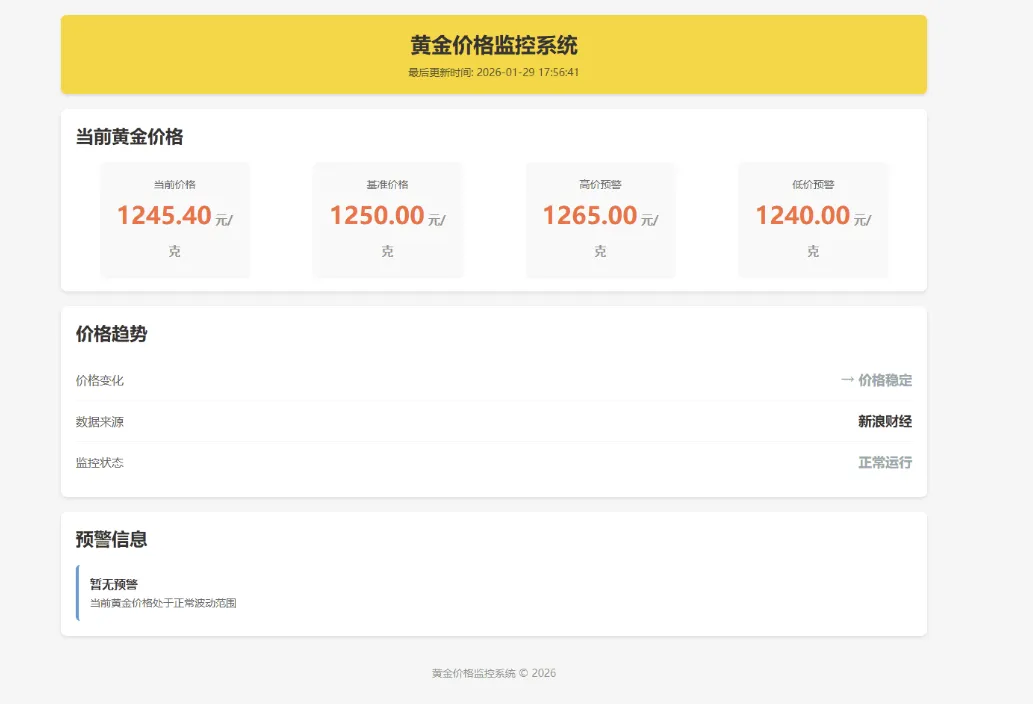 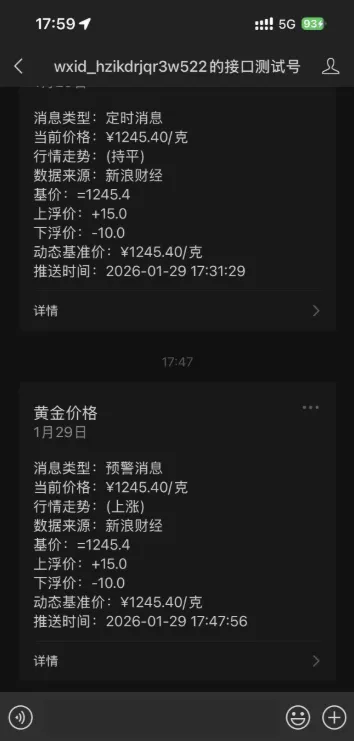 代码access_token.py import requestsimport timefrom logger_config import get_loggerfrom config import APP_ID, APP_SECRET# 获取日志记录器logger = get_logger(__name__)class AccessToken: """ 微信公众号 Access Token 管理类 """ def __init__(self): self.access_token = None self.token_expire_time = 0 def get_access_token(self): """ 获取access_token :return: access_token或None """ # 检查token是否仍然有效 if self.access_token and time.time() < self.token_expire_time: logger.debug("使用缓存的Access Token") return self.access_token url = 'https://api.weixin.qq.com/cgi-bin/token?grant_type=client_credential&appid={}&secret={}'.format( APP_ID, APP_SECRET) headers = { 'User-Agent': 'Mozilla/5.0 (Windows NT 10.0; Win64; x64) AppleWebKit/537.36 (KHTML, like Gecko) ' 'Chrome/91.0.4472.124 Safari/537.36' } try: response = requests.get(url, headers=headers, timeout=10) response.raise_for_status() # 检查HTTP状态码 result = response.json() if 'access_token' in result: self.access_token = result['access_token'] # 设置过期时间(提前5分钟刷新) expires_in = result.get('expires_in', 7200) self.token_expire_time = time.time() + expires_in - 300 logger.info("成功获取新的Access Token") return self.access_token else: logger.error(f"获取Access Token失败: {result}") self._reset_token() return None except requests.exceptions.RequestException as e: logger.error(f"HTTP请求异常: {e}") self._reset_token() return None except ValueError as e: logger.error(f"响应解析异常: {e}") self._reset_token() return None except Exception as e: logger.error(f"获取Access Token发生未知异常: {e}") self._reset_token() return None def _reset_token(self): """ 重置token信息 """ self.access_token = None self.token_expire_time = 0 def refresh_access_token(self): """ 手动刷新access_token """ # 清除当前token信息 self.access_token = None self.token_expire_time = 0 self.get_access_token()复制代码数据抓取来源data_source.py# coding: utf-8"""黄金价格数据源模块负责获取和处理黄金价格数据"""import timeimport requestsfrom logger_config import get_loggerfrom playwright.sync_api import sync_playwrightfrom config import PRICE_CACHE_EXPIRATION# 获取日志记录器logger = get_logger(__name__)# 备选数据源配置GOLD_PRICE_SOURCES = [ { "name": "新浪财经-黄金频道", "url": "https://finance.sina.com.cn/nmetal/", "method": "playwright" }, { "name": "新浪财经-黄金期货", "url": "https://finance.sina.com.cn/futures/quotes/XAU.shtml", "method": "playwright" }, { "name": "新浪财经-API", "url": "https://hq.sinajs.cn/list=njs_gold", "method": "api" }]# 时间变量TIMEOUT = 10 # 通用超时时间(秒)RETRY_COUNT = 3 # 重试次数RETRY_INTERVAL = 2 # 重试间隔(秒)# 缓存机制class PriceCache: """ 价格缓存类,管理价格数据的缓存 用于减少重复的网络请求,提高性能 """ def __init__(self, expiration=PRICE_CACHE_EXPIRATION): self._cache = {} # 缓存字典 self._expiration = expiration # 缓存过期时间(秒) def get(self, key): """ 获取缓存数据,如果过期则返回None :param key: 缓存键 :return: 缓存值或None """ if key in self._cache: cached_data = self._cache[key] if time.time() < cached_data['expires_at']: return cached_data['value'] else: # 缓存已过期,删除它 del self._cache[key] return None def set(self, key, value): """ 设置缓存数据 :param key: 缓存键 :param value: 缓存值 """ self._cache[key] = { 'value': value, 'expires_at': time.time() + self._expiration } def clear(self): """ 清除所有缓存数据 """ cache_size = len(self._cache) self._cache.clear() logger.info(f"缓存已全部清除,共清除 {cache_size} 条记录") def clear_key(self, key): """ 清除指定键的缓存数据 :param key: 缓存键 """ if key in self._cache: del self._cache[key] logger.info(f"已清除缓存键: {key}") return True return False # 创建价格缓存实例price_cache = PriceCache() # 使用配置文件中的缓存过期时间def get_gold_price_from_sina_page_playwright(url): """ 使用 Playwright 从新浪财经页面获取黄金价格 :param url: 数据源URL :return: 价格数据字典或None """ browser = None page = None try: with sync_playwright() as p: # 启动浏览器 (增加超时时间) browser = p.chromium.launch(headless=True, timeout=15000) page = browser.new_page() # 设置用户代理 page.set_extra_http_headers({ "User-Agent": "Mozilla/5.0 (Windows NT 10.0; Win64; x64) AppleWebKit/537.36 (KHTML, like Gecko) " "Chrome/120.0.0.0 Safari/537.36" }) # 访问页面 (增加超时时间) page.goto(url, timeout=20000) # 等待元素出现 (增加超时时间) page.wait_for_selector("#realtimeGC", timeout=20000) # 获取价格链接元素,通过CSS选择器精确定位 price_link_element = page.locator("#realtimeGC > .r_g_price_c_r > a") # 获取人民币价格 price_text = price_link_element.locator(".r_g_price_now").text_content(timeout=10000) # 获取价格变化 price_change_text = price_link_element.locator(".r_g_price_change").text_content(timeout=10000) # 解析价格文本 if price_text: # 移除可能的空格和换行符 price_text = price_text.strip() try: price = float(price_text) if price <= 0: logger.error("Playwright获取页面价格数据异常,获取到的价格为0或负数") return None # 返回包含所有价格相关信息的对象 result = { "price": price, "change": price_change_text.strip() if price_change_text else "", "timestamp": int(time.time()), "readable_time": time.strftime("%Y-%m-%d %H:%M:%S", time.localtime()) } return result except ValueError as e: logger.error(f"价格文本转换为数字失败: {e}, 原始文本: {price_text}") return None else: logger.error("无法解析页面价格数据(Playwright方式),未找到有效价格文本") return None except Exception as e: logger.error(f"使用Playwright抓取页面失败: {e}") return None finally: # 确保浏览器和页面总是被关闭 # 注意:在 with sync_playwright() 上下文内,Playwright 会自动关闭资源 # 这里的关闭操作可能会因为事件循环已关闭而失败,所以添加 try-except if page: try: page.close() except Exception as e: logger.debug(f"关闭页面失败(可能是因为事件循环已关闭): {e}") if browser: try: browser.close() except Exception as e: logger.debug(f"关闭浏览器失败(可能是因为事件循环已关闭): {e}")def get_gold_price_from_api(url): """ 使用API方式获取黄金价格(更轻量级,速度更快) :param url: API数据源URL :return: 价格数据字典或None """ try: # 发送HTTP请求获取数据 response = requests.get(url, timeout=TIMEOUT) response.raise_for_status() # 检查HTTP状态码 # 解析新浪财经API返回的数据 # 新浪财经API返回格式:var hq_str_njs_gold="黄金T+D,453.50,453.50,453.50,453.50,0.00,0.00,09:29:59,2023-12-01"; data = response.text.strip() if data and "=" in data and """ in data: # 提取引号内的数据部分 data_part = data.split("=")[1].strip().strip(""") # 分割数据字段 fields = data_part.split(",") if len(fields) >= 8: # 新浪财经API数据格式:产品名称,最新价,开盘价,最高价,最低价,涨跌额,涨跌幅,时间,日期 price_str = fields[1].strip() try: price = float(price_str) if price <= 0: logger.error(f"API获取价格数据异常,获取到的价格为0或负数: {price}") return None # 返回包含所有价格相关信息的对象 result = { "price": price, "change": fields[5].strip() if len(fields) > 5 else "", "timestamp": int(time.time()), "readable_time": time.strftime("%Y-%m-%d %H:%M:%S", time.localtime()) } return result except ValueError as e: logger.error(f"API价格文本转换为数字失败: {e}, 原始文本: {price_str}") return None else: logger.error(f"API返回数据格式异常,字段数量不足: {fields}") return None else: logger.error(f"API返回数据格式异常,无法解析: {data}") return None except Exception as e: logger.error(f"使用API获取数据失败: {e}") return Nonedef get_gold_price(): """ 获取黄金价格的主函数,尝试多个数据源 使用缓存机制以提高性能 :return: 黄金价格(元/克)或None """ # 检查缓存 cached_price = price_cache.get('gold_price') if cached_price is not None: logger.info("使用缓存的金价数据") return cached_price # 遍历所有备选数据源 for source in GOLD_PRICE_SOURCES: source_name = source["name"] source_url = source["url"] source_method = source["method"] logger.info(f"尝试从 {source_name} 获取黄金价格") # 根据数据源类型选择不同的获取方式 for retry in range(RETRY_COUNT): try: if source_method == "api": # 使用API方式获取数据(更轻量级) price_data = get_gold_price_from_api(source_url) else: # 使用Playwright方式获取数据 price_data = get_gold_price_from_sina_page_playwright(source_url) if price_data is not None: # 更新缓存 price_cache.set('gold_price', price_data["price"]) logger.info(f"成功获取黄金价格: ¥{price_data['price']}/克") return price_data["price"] else: logger.warning(f"从 {source_name} 获取数据失败,第 {retry + 1} 次尝试") if retry < RETRY_COUNT - 1: time.sleep(RETRY_INTERVAL) except Exception as e: logger.error(f"从 {source_name} 获取数据时发生异常: {e}, 第 {retry + 1} 次尝试") if retry < RETRY_COUNT - 1: time.sleep(RETRY_INTERVAL) # 所有方案都失败 logger.error("所有数据源获取失败,无法获取黄金价格") return Nonedef display_price_info(price, last_price=None): """ 显示价格信息和涨跌情况 """ # 获取价格涨跌箭头 arrow, direction = get_price_arrow(price, last_price) # 获取当前时间 time.strftime("%Y-%m-%d %H:%M:%S", time.localtime()) return arrow, directiondef get_price_arrow(price, last_price): """ 根据当前价格与基准价格比较,判断价格上涨或下跌 返回相应的箭头符号和描述文字 """ # 如果没有上一次价格记录,则认为是持平 if last_price is None: return "(持平)", "持平" # 判断涨跌 if price > last_price: return "(上涨)", "上涨" elif price < last_price: return "(下跌)", "下跌" else: return "(持平)", "持平"复制代码主程序main.pyimport timefrom datetime import datetime, time as dt_time# 导入配置文件from config import PUSH_START_TIME, PUSH_END_TIME, REGULAR_PUSH_MINUTES, REGULAR_PUSH_WINDOW, DATA_FETCH_INTERVAL# 延迟导入TEST_MODE,需要时重新导入import importlibimport config# 导入数据获取和处理模块from data_source import get_gold_price, display_price_info# 导入黄金预警管理器from gold_alert import gold_alert_manager# 导入消息发送模块from message import MessageSender# 导入日志配置from logger_config import get_logger# 导入工具函数from utils import build_message_data, send_push_message, is_push_blocked# 获取日志记录器logger = get_logger(__name__)# 全局变量last_price = None # 记录上一次的价格,用于比较价格变化first_run = True # 标记是否为首次运行# 消息发送实例 - 延迟初始化,在run_gold_price_monitor函数中创建message_sender = Nonedef is_within_push_time(): """ 检查当前时间是否在推送时间范围内(工作日) :return: bool 是否在推送时间范围内 """ # 获取当前日期和时间 current_datetime = datetime.now() now = current_datetime.time() weekday = current_datetime.weekday() # 获取星期几,0=周一,4=周五,5=周六,6=周日 # 检查是否为工作日(周一到周五) if weekday > 4: # 周六或周日 logger.debug(f"当前为非工作日({weekday}),跳过推送") return False # 如果是测试模式,记录日志但不忽略时间限制 if config.TEST_MODE: logger.info("[测试模式] 按照正常时间范围进行推送") start_time = dt_time.fromisoformat(PUSH_START_TIME) end_time = dt_time.fromisoformat(PUSH_END_TIME) # 处理跨日期的情况(例如:22:00 到 06:00) if start_time <= end_time: # 不跨日期,正常区间判断 return start_time <= now <= end_time else: # 跨日期,例如 22:00 到 06:00 return now >= start_time or now <= end_timedef is_push_minute(): """ 检查当前时间是否应该进行定期推送 逻辑: 1. 检查当前时间是否在配置的推送分钟点的时间窗口内 2. 确保每个推送周期只推送一次 :return: bool 是否为推送分钟 """ now = datetime.now() current_hour = now.hour current_minute = now.minute # 获取上次推送的状态 last_push_status = gold_alert_manager.push_status_manager.last_regular_push_minute # 解析上次推送的小时和分钟 if last_push_status > 100: last_push_hour = last_push_status // 100 last_push_min = last_push_status % 100 else: # 兼容旧格式 last_push_hour = -1 last_push_min = last_push_status # 检查当前推送周期是否已经推送过 # 推送周期是指:当前小时的当前分钟(测试模式下)或配置的推送分钟点(正式模式下) if config.TEST_MODE: # 测试模式下,每个小时只推送一次 current_push_cycle = current_hour last_push_cycle = last_push_hour logger.info("[测试模式] 忽略推送分钟限制,允许随时推送,但每个小时只推送一次") else: # 正式模式下,检查当前时间是否在配置的推送分钟点的时间窗口内 # 计算当前应该推送的分钟点 should_push = False target_minute = None for push_min in REGULAR_PUSH_MINUTES: # 计算推送窗口的开始和结束时间 window_start = push_min window_end = push_min + REGULAR_PUSH_WINDOW # 检查当前分钟是否在推送窗口内 if window_start <= current_minute <= window_end: should_push = True target_minute = push_min break if not should_push: return False # 正式模式下,推送周期是当前小时的当前推送分钟点 current_push_cycle = current_hour * 100 + target_minute last_push_cycle = last_push_hour * 100 + last_push_min if last_push_hour != -1 else -1 # 如果当前推送周期已经推送过,直接返回False if current_push_cycle == last_push_cycle: logger.debug(f"当前推送周期 {current_push_cycle} 已经推送过,跳过本次推送") return False # 当前时间符合推送条件,允许推送 return Truedef send_regular_price_update(price, arrow): """ 发送定期价格更新消息 :param price: 当前价格 :param arrow: 价格变化箭头 """ # 使用工具函数构建消息数据 message_data = build_message_data(price, arrow, gold_alert_manager, push_type="regular") # 使用通用推送函数发送消息 result = send_push_message(message_sender, message_data, push_type="regular") return result['success']def run_gold_price_monitor(): """ 运行黄金价格监控循环 根据需求调整逻辑: 1. 每5分钟抓取一次黄金价格数据 2. 在指定时间点(每小时01分和31分)进行定期推送 3. 当价格达到预警阈值时立即推送(不影响定时推送规则) 4. 生成HTML文件用于Web预览(根据配置) 5. 编译Windows运行文件(根据配置) """ # 声明全局变量 global last_price, message_sender, first_run # 初始化消息发送实例 if message_sender is None: message_sender = MessageSender() # 编译Windows运行文件(根据配置,只执行一次) import config if config.GENERATE_TYPE == 2: logger.info("开始编译Windows运行文件...") from windows_compile import WindowsCompiler compiler = WindowsCompiler() if compiler.compile(onefile=True, console=True): logger.info("Windows运行文件编译成功") else: logger.error("Windows运行文件编译失败") logger.error("编译失败,程序将停止运行") return # 编译失败,停止程序运行 # 主循环 while True: try: # 检查是否被禁止推送 if is_push_blocked(): logger.error("当天已被禁止推送,程序将停止运行") return # 被禁止推送,停止程序运行 # 1. 获取当前金价 price = get_gold_price() if price is not None: # 2. 显示价格信息并获取价格变化趋势 arrow, direction = display_price_info(price, last_price) # 3. 记录当前价格用于下次比较 last_price = price # 4. 获取当前时间信息 now = datetime.now() current_minute = now.minute # 5. 保存原始的dynamic_base_price,用于HTML生成 # 这样可以在预警触发时正确显示预警信息 original_base_price = gold_alert_manager.dynamic_base_price # 6. 检查预警条件(立即推送) # 这会更新dynamic_base_price within_push_time = is_within_push_time() if not is_push_blocked() and within_push_time: alert_result = gold_alert_manager.check_alert_conditions(price) # 7. 生成HTML文件(根据配置,不受时间范围和微信推送逻辑影响) import config if config.GENERATE_TYPE == 1: from generate_html import HTMLGenerator html_generator = HTMLGenerator() # 生成HTML时使用原始的base_price,这样可以显示预警信息 html_data = { 'current_price': price, 'last_price': last_price, 'base_price': original_base_price } html_path = html_generator.generate_html(html_data) if html_path: logger.info(f"成功生成HTML文件: {html_path}") else: logger.error("生成HTML文件失败") logger.error("HTML生成失败,程序将停止运行") return # HTML生成失败,停止程序运行 # 8. 检查是否需要进行定期推送 if within_push_time: # 检查当前是否为推送分钟 if is_push_minute(): # 发送定期价格更新 if send_regular_price_update(price, arrow): # 更新推送状态 gold_alert_manager.push_status_manager.reset_regular_push_status(current_minute, price) logger.info(f"定期推送完成,重置推送状态: 分钟={current_minute}") else: # 如果定期推送失败,可能表示推送服务出现问题 logger.warning("定期推送失败,检查是否被禁止推送") if is_push_blocked(): logger.error("当天已被禁止推送,程序将停止运行") return # 被禁止推送,停止程序运行 # 9. 每5分钟抓取一次数据 time.sleep(DATA_FETCH_INTERVAL) else: # 10. 无法获取金价数据时的处理 logger.error(f"无法获取金价数据,程序将停止运行") return # 无法获取价格数据,停止程序运行 except KeyboardInterrupt: # 9. 处理用户中断 logger.info("程序已退出") break except Exception as e: # 10. 处理其他异常 logger.error(f"程序运行异常: {e}", exc_info=True) # 记录完整的异常信息 # 检查是否被禁止推送 if is_push_blocked(): logger.error("当天已被禁止推送,程序将停止运行") return time.sleep(10) # 短暂休眠后重试if __name__ == "__main__": run_gold_price_monitor()复制代码整套程序下载地址:https://xiaok.lanzoum.com/inBqx3he2nwh(含有部署到宝塔教程!) |